If you’ve spent money on email traffic and got nothing back, you already know the feeling of watching hard earned money disappear into the void. Most people who try solo ads for the first time lose money because they treat their traffic like a one time event rather than a long term asset. They pay for a click, the visitor lands on the page, and if that person doesn’t subscribe immediately, they are gone forever. This is where most campaigns fail, but there is a way to fix it.
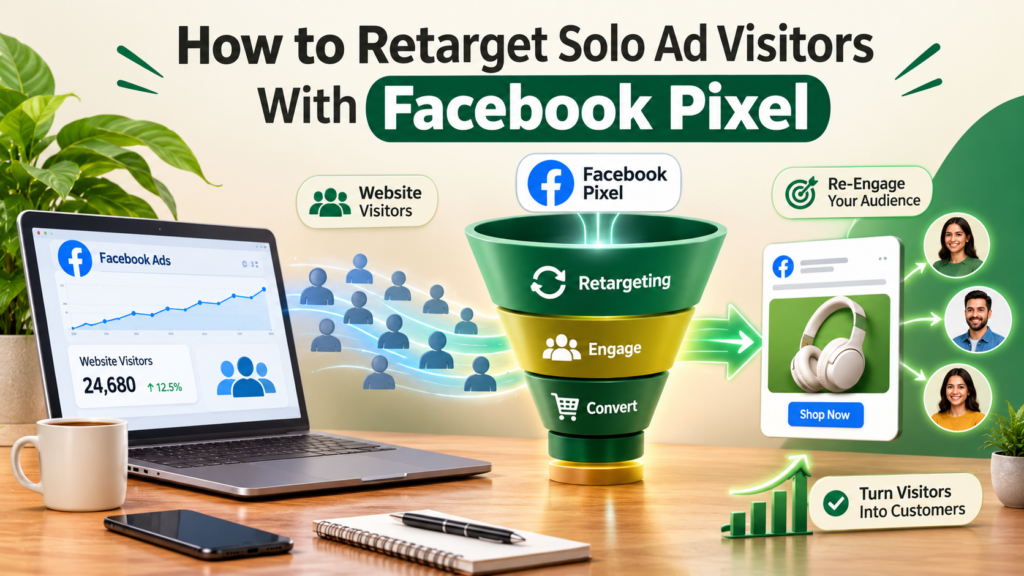
Learning how to retarget solo ad visitors with Facebook Pixel allows you to follow those lost visitors around the internet until they finally decide to join your list. Instead of paying for a single impression and hoping for the best, you are building a digital net that catches everyone who slips through the cracks. It’s the difference between a high stakes gamble and a predictable marketing system. For example, if you pay for 200 clicks and get a 30% opt in rate, you still have 140 people who saw your offer but didn’t take action, and retargeting lets you reach them again for pennies.
Table of Contents
The Hidden Problem With Cold Solo Ad Traffic
Solo ads are a fantastic way to get instant traffic to your landing page. You are essentially renting another marketer’s audience to build your own. However, let’s be real about the psychology of a solo ad visitor. These people are busy, they are often clicking through dozens of emails, and they might not be in the right headspace to sign up for your offer the second they see it.
One thing I’ve noticed is that beginners often blame the traffic vendor when they don’t see immediate sales. The reality is that cold traffic rarely converts into a high ticket buyer on the first visit. You need to build familiarity and trust before someone opens their wallet. For example, if a vendor delivers 500 clicks to your affiliate bridge page, you might see a 40% opt in rate, but the remaining 300 visitors are usually treated as a total loss even though they’ve already shown interest in your niche.
By using a pixel, you turn that “lost” traffic into a custom audience. You can then show these people helpful videos, testimonials, or a different lead magnet on their Facebook feed. This keeps your brand in front of them without you having to buy more solo ad clicks from the same vendor. It creates a multi channel approach that makes your small business look much larger and more professional than it actually is.
How the Facebook Pixel Works With Your Squeeze Page
The Facebook Pixel is just a tiny snippet of code that you place on your website. Think of it like a digital “cookie jar” that tags everyone who lands on your page. When a solo ad visitor clicks the link in the vendor’s email and lands on your squeeze page, the pixel fires and tells Facebook that this specific user is interested in your topic. This happens in the background without slowing down your page or distracting the visitor.
The magic happens when that visitor leaves your page and goes back to scrolling through their Facebook feed. Because they are now part of your pixel audience, you can serve them targeted ads that specifically address the offer they just saw. For example, if you are promoting a weight loss offer and someone hits your page but doesn’t sign up, you can show them a Facebook ad the next day featuring a 5 star testimonial from a successful customer. This second touch point often has a much higher conversion rate than the initial cold click.
Setting this up is simpler than most people think. You don’t need to be a coder or a technical genius to get the pixel installed. Most landing page builders have a dedicated spot where you can just paste your Pixel ID. Once it’s there, you can start tracking every visitor that comes through your solo ad campaigns. Honestly, running traffic without a pixel is like trying to fill a bucket that has a massive hole in the bottom.
Step By Step Technical Setup for Beginners
First, you need to go into your Facebook Events Manager and create a new data source. Facebook will give you a string of code or a specific ID number. You need to take this and place it in the “Head” section of your squeeze page and your “Thank You” page. This allows you to track not just who visited, but who actually signed up. For example, if 1,000 people visit your page and 300 of them reach the thank you page, you can tell Facebook to stop showing ads to those 300 people and only focus on the 700 who didn’t subscribe.
Here’s what most beginners miss during the setup process. They forget to test if the pixel is actually working before they start spending money on traffic. You should use the “Facebook Pixel Helper” extension for Chrome to verify that the code is firing correctly. You don’t want to spend $200 on a solo ad only to realize later that your pixel wasn’t capturing any data. I learned this the hard way after running a large campaign that resulted in zero tracked events because of a simple copy and paste error.
Once the pixel is active, you can create “Custom Audiences” inside the Facebook Ad Manager. You can create an audience of people who visited your landing page in the last 30 days. This ensures that your ads are only being shown to people who have recently interacted with your brand. For example, setting a 14 day window for your retargeting audience ensures you are reaching people while your offer is still fresh in their minds, which typically leads to a lower cost per lead compared to a 180 day window.
Understanding the Costs and ROI of Retargeting
The best part about retargeting is that it is incredibly cheap compared to buying cold traffic. When you buy a solo ad, you might pay $0.50 to $0.90 per click. When you retarget those same people on Facebook, you are often paying for impressions, and the cost to reach a few hundred people is usually just a couple of dollars a day. It is one of the most cost effective ways to increase your overall return on investment.
Think about it this way. You’ve already paid the “heavy lifting” cost to get them to your site the first time. Retargeting is just the “reminder” cost that brings them back to finish the job. For example, a marketer spending $100 on a 200 click solo ad might get 60 leads at a cost of $1.66 per lead. By spending an extra $10 on Facebook retargeting over the next week, they might pick up another 20 leads from the same 200 clicks, bringing their average lead cost down to $1.37.
| Campaign Type | Traffic Cost | Leads Generated | Cost Per Lead |
|---|---|---|---|
| Solo Ad Only (300 Clicks) | $180.00 | 90 | $2.00 |
| Solo Ad + FB Retargeting | $205.00 | 135 | $1.51 |
| The Difference | +$25.00 | +45 | -24.5% Savings |
The table above shows how a small additional investment in retargeting can significantly lower your customer acquisition costs. You are squeezing more value out of every single dollar you spend with a traffic vendor. For example, if you find a great vendor on the Solo Ad Hub training library, you can use retargeting to maximize that high quality traffic and scale your business much faster.
Creating the Perfect Retargeting Ad Creative
When you create your Facebook ad, don’t just use the same headline from your squeeze page. These people have already seen that headline and they didn’t opt in. You need to try a different angle to grab their attention this time. Use a “pattern interrupt” approach that makes them stop scrolling and remember who you are.
A good retargeting ad often starts with something like, “Hey, did life get in the way?” or “I noticed you didn’t get a chance to download your report.” This makes the ad feel personal and relevant. For example, if your solo ad was for a crypto trading course, your retargeting ad could feature a short video of you showing a 15% profit trade from that morning to prove the system works. This adds social proof and handles the objections they might have had during their first visit.
Keep your images simple and clean. Avoid using too much text on the image, as Facebook’s algorithm still prefers images that look like natural content. A picture of a smiling person or a screenshot of a specific result usually works best. For example, using a real photo of yourself instead of a generic stock photo can increase your click through rate by as much as 25% because it builds immediate trust with the viewer.
The Essential Retargeting Setup Checklist
To make sure you don’t miss any steps, follow this quick checklist before you launch your next traffic campaign. Success in solo ads comes from being organized and following a repeatable process. You can find more detailed guidance on these strategies at ClickMagick tracking software to ensure your clicks are being properly attributed.
- Generate your Facebook Pixel code and install it in the global header of your site.
- Create a “Lead” event for your Thank You page to distinguish subscribers from non subscribers.
- Set up a Custom Audience for “Website Visitors” with a 30 day duration.
- Exclude the “Subscribers” audience from your retargeting ad set so you don’t waste money showing ads to people already on your list.
- Create 2 to 3 different ad variations to test which one brings people back to the squeeze page most effectively.
- Start with a very small budget of $2 to $5 per day.
This checklist ensures you have the technical foundation to scale. For example, if you forget to exclude your current subscribers, you could end up spending $50 a month showing ads to people who are already reading your emails, which is a complete waste of your marketing budget.
Common Mistakes When Retargeting Solo Ad Traffic
The biggest mistake I see is people starting their retargeting ads too late. You want the ad to start appearing as soon as the visitor leaves your site. If you wait a week to turn on your retargeting, the visitor will have forgotten who you are and why they were interested in your offer. Speed is your best friend when it comes to regaining lost traffic.
Another mistake is having a massive disconnect between the solo ad and the retargeting ad. If the solo ad promised a “Free Guide to Passive Income” but the Facebook ad is talking about “High Ticket Coaching,” the visitor will be confused. You must maintain “congruency” across all your platforms. For example, if your landing page uses a specific blue and white color scheme, using those same colors in your Facebook ad can increase brand recognition by 15% or more, making the user feel more comfortable clicking the link.
Lastly, don’t overcomplicate your audience segments in the beginning. Some marketers try to create 10 different audiences for every tiny action a visitor takes. If you are just starting out, a single audience of “all visitors who didn’t subscribe” is all you need. For example, a beginner with a small 200 click campaign won’t have enough data to make a “5 minute dwell time” audience effective, so keep it simple until you are sending thousands of clicks per month.
Using Advanced Tracking to Optimize Your Results
If you want to get serious about solo ads, you need to know which specific vendors are providing the visitors who actually convert through retargeting. Not all solo ad traffic is created equal. Some vendors have lists that are highly responsive to Facebook ads, while others might provide traffic that never engages with social media content. You need a way to track the “path to conversion” for every lead you generate.
Here’s the thing, most standard tracking links only tell you about the first click. You need to use “sub-IDs” or tracking parameters to see the full picture. For example, if you buy 100 clicks from Vendor A and 100 clicks from Vendor B, and you see that Vendor A’s traffic results in 5 retargeting signups while Vendor B’s results in 0, you know exactly where to spend your next $500. This data driven approach removes the guesswork from your marketing.
Think about it this way, you are looking for the highest quality audience, not just the cheapest clicks. A vendor might charge $0.40 a click, but if that traffic doesn’t convert even with retargeting, it’s more expensive than a $0.70 click that converts at a high rate. For example, spending $70 for 100 high quality clicks that result in 40 total leads is a much better deal than spending $40 for 100 clicks that only result in 10 leads, regardless of how much retargeting you do.
Why You Should Scale Slowly and Test Often
Scaling a solo ad business is exciting, but it’s where many people lose their shirts. The key is to increase your budget incrementally as you see positive results from your retargeting. Never jump from a 100 click order to a 2,000 click order overnight. You need to make sure your retargeting ads can handle the increased volume of visitors without the cost per click skyrocketing.
One thing I’ve noticed is that ad fatigue happens much faster with small retargeting audiences. Because you are only showing ads to a few hundred people, they might see your ad 5 or 6 times in a single day. This is known as “frequency,” and if it gets too high, your costs will go up and people will start hiding your ads. For example, if your ad frequency reaches 8.0 within a 3 day period, your click through rate will likely drop by 50% as your audience becomes annoyed by the constant repetition.
Keep a close eye on your Facebook Ad Manager dashboard. If you see the frequency climbing, it’s time to swap out your image or change your headline. Constant testing is the price of long term success in the solo ad niche. For example, rotating three different ad images every two weeks can keep your retargeting campaign fresh and profitable for months without you having to constantly create new content from scratch.
Conclusion
Retargeting solo ad visitors with a Facebook Pixel is one of the smartest moves you can make as an online marketer. It turns a one time traffic source into a multi touch marketing machine that builds your list and your brand simultaneously. Let’s be real, the old way of buying clicks and hoping for a one minute conversion is becoming harder every day. You need to use the tools available to stay ahead of the competition and maximize every dollar you spend.
By following the steps outlined in this guide, you can significantly lower your lead costs and increase your overall conversion rates. Start small, get your pixel installed today, and watch how your traffic starts working harder for you. For example, even a tiny $2 a day retargeting budget can capture 10 to 15 extra leads per month that you would have otherwise lost forever. Take action now and stop letting your solo ad traffic go to waste. It is time to start building a real, sustainable audience that knows, likes, and trusts your brand.
Frequently Asked Questions
Does the Facebook Pixel slow down my landing page loading speed?
The pixel code is extremely lightweight and loads asynchronously, which means it doesn’t stop the rest of your page from loading. Most visitors will never even know it’s there. For example, a standard squeeze page with a pixel installed will usually load in under 2.0 seconds, which is well within the ideal range for maintaining a high conversion rate on mobile devices. You don’t have to worry about losing solo ad clicks due to slow load times caused by the pixel.
How much traffic do I need before I start retargeting?
You can start retargeting as soon as you have your first visitor, but Facebook usually needs a small base of data to optimize your ads effectively. Most marketers find that having at least 100 to 200 visitors in their custom audience is a good starting point for a test. For example, if you buy a 200 click solo ad pack and 140 people don’t opt in, you already have a large enough audience to launch a retargeting campaign with a $2 daily budget and see meaningful results within the first week.
Can I retarget people if I am promoting an affiliate offer directly?
If you are sending traffic directly to an affiliate link that you don’t own, you cannot place your pixel on that page. This is why it is essential to use a squeeze page or a bridge page that you control. For example, if you send 500 clicks directly to a ClickBank offer, you lose 100% of the tracking data for those visitors. However, if you send them to your own landing page first, you can pixel 100% of them before they ever see the affiliate offer, giving you the power to follow up later.
Will Facebook ban my account for retargeting solo ad traffic?
Facebook does not care where your website traffic comes from as long as your landing page and your ads comply with their advertising policies. You are simply retargeting people who visited your site. For example, as long as your squeeze page isn’t making “get rich quick” claims or using deceptive images that violate Facebook’s 20% text rule, you can safely retarget thousands of solo ad visitors every month without any issues from the compliance team. Just focus on providing value and staying within the guidelines.
What is the best daily budget for a small retargeting campaign?
For most beginners, a budget of $3 to $5 per day is more than enough to reach a standard solo ad audience. Because your audience is so small and specific, you don’t need to spend a lot of money to reach everyone. For example, if your custom audience has 500 people in it, a $5 daily budget will often result in every person in that audience seeing your ad at least twice a day. This ensures high visibility without overspending on a broad or disinterested audience that won’t convert anyway.
How long should I keep someone in my retargeting audience?
This depends on your specific offer, but a 14 to 30 day window is usually the “sweet spot” for email list building. If they haven’t joined your list after 30 days of seeing your ads, they are likely not going to subscribe at this time. For example, setting your pixel audience to expire after 30 days ensures that your ad spend is always focused on the “warmest” leads who have recently shown interest. This prevents you from wasting money on cold prospects who visited your page months ago and have moved on to other things.